SMS consent
How Pairo collects consent before sending a text
Pairo sends exactly one kind of message: a one-time sign-in code, in response to a request the person just made.
No marketing. No promotions. No bulk sends. No purchased or imported lists. There is no way to receive a message from Pairo without asking for one first.
How someone opts in
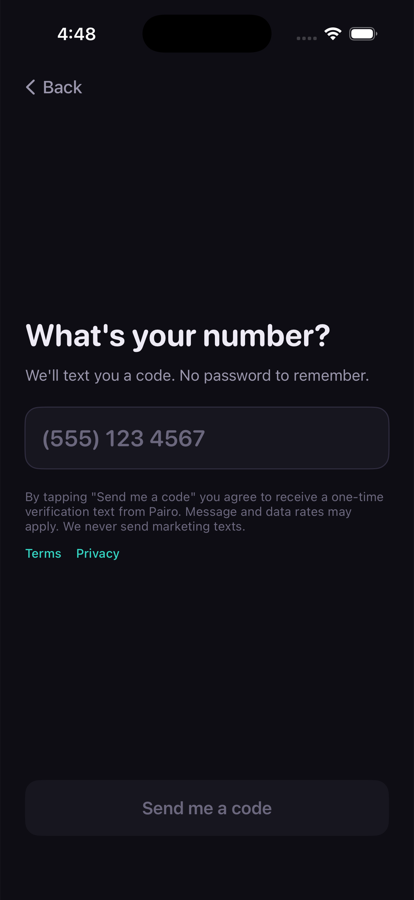
The Pairo sign-in screen, exactly as it appears in the app.
- A person installs the Pairo app on their iPhone.
- They tap “Use my phone number” on the welcome screen.
- They type their own phone number into the field.
- Directly beneath the field, before they can continue, they read:
“By tapping Send me a code you agree to receive a one-time verification text from Pairo. Message and data rates may apply. We never send marketing texts.”
with links to the Terms and Privacy Policy. - They tap Send me a code. Only then is a message sent, and only to the number they just typed.
What the message says
Your Pairo verification code is: 123456
That is the entire message, and the only kind of message Pairo sends. Codes are sent through Twilio Verify, using Twilio's standard wording.
Frequency
One message per sign-in attempt. A person who signs in once receives one message. Most people receive a handful a year.
Opting out
Replying STOP to the number the code came from stops further texts from that number to that phone; Twilio handles this automatically. Because the only message is a sign-in code the person asked for, opting out simply means they may no longer be able to sign in by text — nothing else changes, and no other messages exist to stop.
Replies to the text are not read by a person. For help, email hello@getpairo.com, which a person reads.
Who we are
Pairo
Poway, California, United States
hello@getpairo.com
getpairo.com